
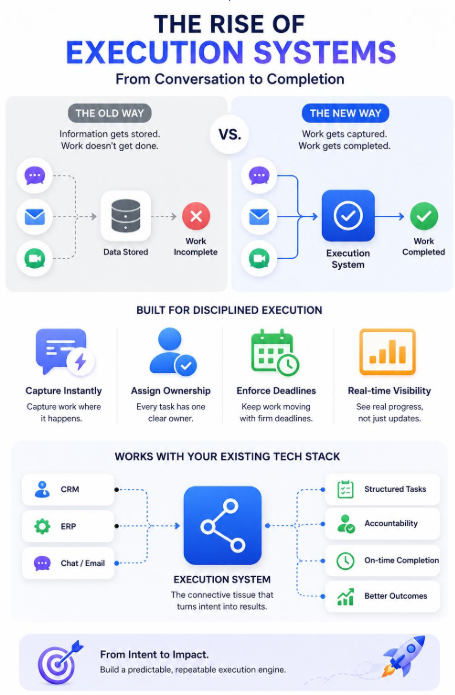

Manual processes often seem perfectly manageable at first, with a spreadsheet here and an email chain there. However, as the team and workload grow, these methods can start creating more problems than they solve. Information becomes scattered, responsibilities can become unclear, and managers may spend more time checking routine work. As operations become more complex, these limitations become increasingly difficult to ignore. Recognising these warning signs early can help growing teams determine when a more structured and reliable approach is needed.
Why Manual Processes Work, Until They Don’t
In the early stages of a team or business, manual processes make a lot of sense. They’re quick to set up, require no learning curve, and workflow software may not seem necessary when the volume of work and number of people involved is small. The trouble is, these same processes rarely scale gracefully. What worked smoothly for a five-person team handling a handful of tasks each week often becomes genuinely chaotic once that team doubles or triples in size, or once task volume increases significantly.
Another issue is that manual processes often depend heavily on individual habits. One person may maintain a spreadsheet carefully while another relies on notes or email reminders. As more people become involved, these differences make it harder to maintain consistency. Eventually, the process itself becomes dependent on people remembering what to do, when to do it, and who needs to be involved next.
Signs a Manual Process Has Outgrown Itself
A few clear signs tend to indicate that manual processes are no longer serving a team well:
- Tasks regularly fall through the cracks because there’s no consistent tracking system
- Approvals and handoffs get delayed simply because someone forgot to follow up
- Team members spend more time updating spreadsheets than doing actual work
- Errors increase because multiple people are editing the same document without proper version control
- New team members struggle to understand the current process without extensive verbal explanation
These problems may appear individually at first, but they often become connected as workload increases. A missed task can delay an approval, which can then affect another team member’s work and eventually push back a deadline. When these situations become routine rather than occasional, the existing process is likely creating unnecessary operational friction.
How Workflow Software Changes the Picture
Workflow software provides a more structured way to manage work as it moves between people, stages, and deadlines. Instead of relying entirely on memory or manual follow-ups, teams can define how work should progress and establish clearer responsibilities at each point. This creates greater consistency while reducing the amount of administrative effort involved in keeping processes moving.
Automating Handoffs and Approvals
One of the most significant shifts workflow software brings is automating the handoffs and approvals that previously relied on someone remembering to follow up manually. Once a task is marked complete, it automatically moves to the next person or stage in the process, with relevant notifications sent without anyone needing to chase it down. This alone removes a substantial amount of the friction and delay that builds up in manual, email-based processes.
This becomes particularly valuable when a process involves several people or departments. Everyone can see what stage the work has reached and what needs to happen next, reducing uncertainty between handoffs. Managers also have a clearer way to identify where work is slowing down instead of relying on individual updates or repeatedly asking team members for status information.
Where a Task Management System Ties It Together
Beyond just automating handoffs, a proper task management system gives every team member a clear, centralised view of their responsibilities, deadlines, and current priorities. Rather than digging through email threads or scattered spreadsheets to figure out what needs attention, everything lives in one place, consistently updated and visible to everyone who needs it. This centralisation is often what makes the biggest practical difference to daily team efficiency.
It also creates a stronger connection between individual responsibilities and wider business processes. Team members can understand not only what they need to complete, but also how their work affects the next stage. Managers can spend less time collecting updates manually and more time addressing genuine bottlenecks, shifting the focus from chasing information to managing progress.
Making the Switch Without Disrupting Daily Work
Transitioning away from manual processes doesn’t need to happen all at once. Starting with the process causing the most frustration, whether that’s task assignment, approvals, or status reporting, makes the change easier for teams to manage. A task management system can provide the structure needed to organise responsibilities and track progress without disrupting daily work.
Before introducing a new system, document the existing process to identify unnecessary steps, duplicated responsibilities, and common delays. This helps teams build a more efficient workflow instead of simply transferring an inefficient manual process into software.
A Simple Readiness Checklist
| Question | If “Yes,” It’s Time to Consider Workflow Software |
| Are tasks regularly missed or forgotten? | Indicates a tracking gap manual methods can’t close |
| Do approvals take longer than they should? | Points to a need for automated handoffs |
| Is the team spending too much time on updates rather than work? | Suggests manual overhead has become excessive |
| Are new team members struggling to understand current processes? | Signals a lack of clear, documented structure |
Recognising the Right Moment to Change
There’s no single, universal moment when every team should switch from manual processes to proper software, it depends entirely on team size, task volume, and how much friction the current approach is genuinely creating. That said, once the signs above start appearing consistently, rather than as occasional one-off frustrations, it’s usually a strong signal that the time has come.
The decision should ultimately be based on whether the current process still gives the team enough visibility and control. If managers are constantly asking for updates, employees are spending valuable time chasing information, or routine processes depend on reminders, the cost of staying manual may already be higher than the effort required to make the change.
Conclusion
Manual processes have their place, but most growing teams eventually reach a point where they create more friction than value. TaskOPad Solutions Private Limited helps teams make this transition smoothly, bringing structure and automation exactly where manual methods start to fall short. The goal is not to replace every manual activity simply for the sake of using software. It is to identify the repetitive, error-prone, and difficult-to-track processes where greater structure can make a measurable difference. Choosing the right areas to automate can help teams maintain clearer workflows while keeping everyday work easier to manage.